
Once a local model serves a team, you need a dashboard, and the first job of that dashboard is unglamorous: track hardware. Local LLM hardware requirements are not a single number you check once at install time. Across the 200 open models in our database, the recorded minimum RAM runs from 4 GB to 963 GB, with a median of just 9 GB. A dashboard that only knows the machine you bought in January will mislead you by March, because the next model someone on the team tries can sit anywhere on that spread.
The spread, counted
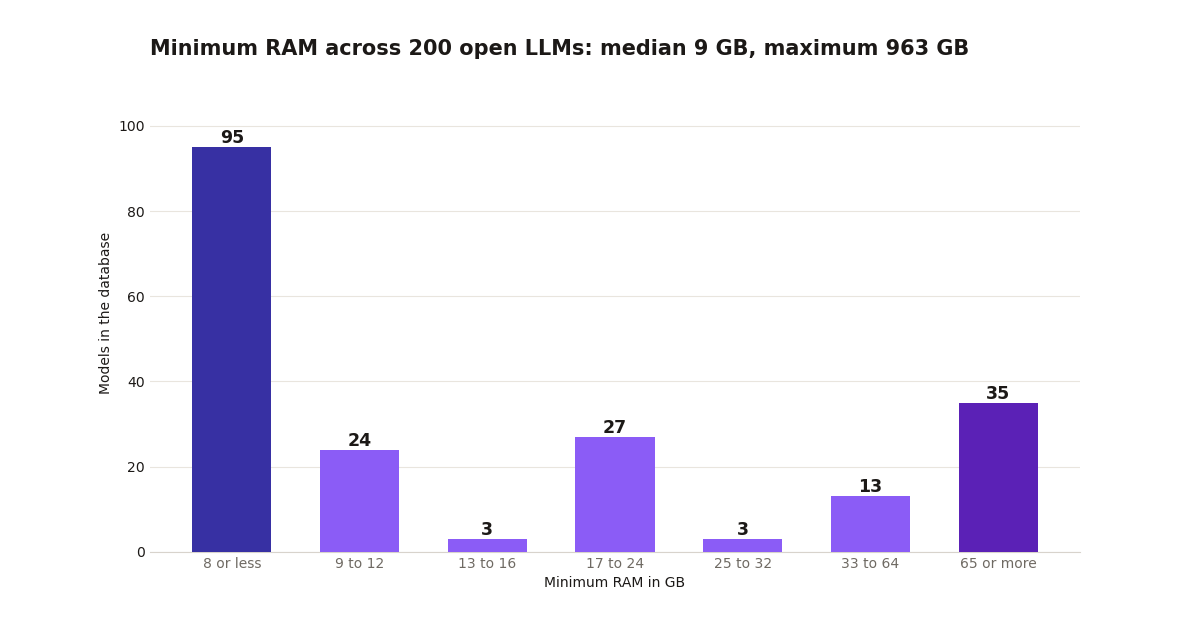
The distribution has a heavy head and a long tail. Ninety-five models need 8 GB of RAM or less. Another 27 models fit in the 9 to 16 GB range, and 27 more sit at 17 to 24 GB, so 149 of the 200 models run inside an ordinary workstation memory budget. Then the tail takes off: 16 models need between 25 and 64 GB, 35 need 65 GB or more, and 28 of those ask for at least 100 GB. The single largest minimum in the database is 963 GB. An average across numbers like these is meaningless, which is why a dashboard has to track requirements per model, not per fleet.
One quirk of the data is worth knowing. In this dataset the recorded minimum RAM equals the recorded minimum VRAM for every model, because the figures describe a single memory pool, the way Apple silicon and other unified-memory machines actually work. On a discrete GPU the two numbers split apart, and a serious dashboard tracks both. Either way, the shape of the problem stays the same: a small set of models that most teams actually run, and a long tail that punishes guesses.
Memory is not the only hardware number on the card. Parameter counts in the database run from 0.07 billion to 1,599 billion, and context windows from 512 tokens to 1,048,576, with 81 models offering 128,000 tokens or more. A dashboard that tracks memory but not context length will still surprise you, because a model that fits can still truncate a long document mid-task. The useful dashboard screen is a per-model card: parameters, minimum RAM, context window, and current usage. Four numbers per model, and every one of them changes the moment somebody swaps the model, which is precisely why they belong on a live dashboard rather than in a spreadsheet written on setup day.
Three routes to a dashboard
1) Self-hosted UIs: Open WebUI gives you a ChatGPT-style interface with user management on your own server, free and open source, but you are the ops team. 2) Managed services: PrivateLLM deploy installs the full private stack for $50 plus usage, then grows into a SaaS management console with a mobile admin app. You get usage metering, access control, and monitoring without hiring for it. 3) Roll your own: llama.cpp server or vLLM behind a custom dashboard, maximum control, maximum maintenance.
For a solo developer, option 1 is fine. For a business that wants AI infrastructure without an AI infrastructure team, option 2 is the honest answer. Dashboards are not decoration: the moment someone asks who used what and what it cost, you need one. Ask vendors who else runs their dashboard in production; a demo is not a deployment.
Start from the machine you have
Before comparing dashboard vendors, pin down your own numbers with the Will It Run? checker: enter your RAM and VRAM and it filters the 200-model database down to what fits, with the near misses shown as well. That list, not a vendor demo fleet, is what your dashboard has to track. If your fits list is twelve small models, buy for twelve small models. If it includes a 100 GB outlier your team genuinely needs, that single row should drive the whole purchasing conversation.
Related reading
The single-machine version of this problem is covered in On-Device AI Admin App, Free Tier First: What Private AI Console Apps Should Show. For managing the stack from a phone, see Mobile Admin Apps for Your Local AI Stack. And the fit check itself is explained in Will It Run? Check Which Local LLMs Fit Your Machine.
Sources: Hugging Face | Ollama