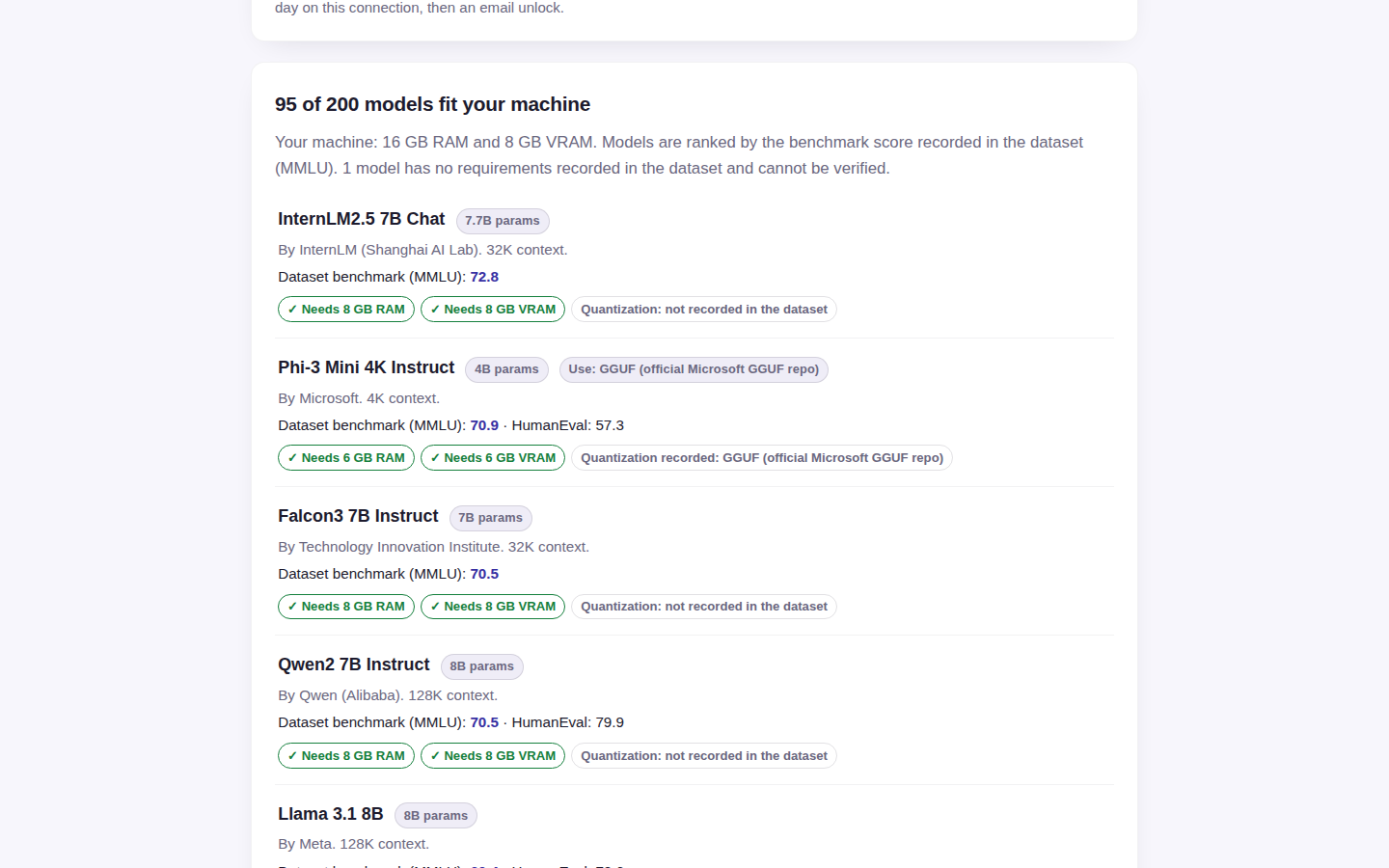
Every week someone downloads a 40 GB model their GPU cannot hold. The fix is boring: check the fit before the download. We ran the default machine in Will It Run? (16 GB RAM, 8 GB VRAM) and 95 of the 200 models in the dataset fit, ranked by recorded MMLU score, with InternLM2.5 7B Chat at the top on 72.8. Here are the seven checks that result teaches.
1. Start from your VRAM, not the model leaderboard
Quantized LLM VRAM is the binding constraint on most machines. A model fits when its recorded minimum RAM and VRAM sit at or under yours. Leaderboards sort by quality; your GPU sorts by memory. Check fit first, then argue about quality among the survivors. Our explainer on quantized LLM VRAM requirements covers the arithmetic.
2. Read the near misses before you upgrade anything
The checker lists models that fail on exactly one resource. A near miss by a whisker of VRAM tells you the cheapest upgrade that unlocks the next tier, and a near miss by a mile tells you to stop shopping. Either way it beats guessing, and it beats the common alternative: buying RAM for a VRAM problem.
3. Pick the quantization the dataset actually records
Quantization is where fit is won or lost, and the honest tools say what they know. Will It Run names the best quantization the dataset records for each model, in a fixed precision order, and says plainly when only a container format like GGUF is recorded. Where per quantization requirements are not published, it invents none. That restraint is the point, and it matches how we treat the numbers in our 70B VRAM answer.
4. Treat unified memory as one pool
On Apple Silicon and similar machines, one memory pool serves CPU and GPU. Checking RAM and VRAM as separate budgets double counts the same silicon. Tick the unified memory box and the pool is checked against both recorded minimums once. Mac owners skip models they could run when they forget this.
5. Rank the fits by benchmark, then sanity check the context
Among the fits, the checker ranks by recorded MMLU. Sixty six of the 200 models carry a recorded score; the rest are listed after, never assigned a number. Then look at context length: a 4K context model and a 128K context model with the same score are different tools. The fit list shows both, so the choice is yours and it is informed.
6. Match the model to the machine you have, on purpose
There is a version of this hobby that is just hardware shopping. Resist it. The best local LLM for your laptop is the best one that fits your laptop, which is why we wrote match the model to the machine. A 7B that answers in seconds beats a 70B that swaps to disk.
7. Recheck when the dataset moves
New models land weekly and requirements get re-verified. A fit list from last season is a historical document. The check takes ten seconds; run it again before a big download, and browse the Ollama library for the runtime side once you know your tier.
Two workflow cousins worth knowing: if you are picking an agent framework rather than a model, FrameworkPicker ranks frameworks from four questions, and ShipSafe Filter screens open models by license before you ship them in a product. Start with the fit: run Will It Run on your machine, and read the short explainer if you have not yet.